Chrome Extension
Type faster. On any page.
Turn any webpage into typing practice — articles, blogs, emails. No extra apps needed.
5/5 stars · 4 ratings · Free forever
Select any text on a webpage and start practicing instantly.
1/50% complete
98% accuracy
72 WPM
Everything you need to practice anywhere
No extra apps. No boring drills. Just type on the pages you already read.
Practice Anywhere
Transform articles, blogs, or any selected text into a typing exercise with a single click.
Real-Time Feedback
See your progress instantly with color-coded cues — green for correct, red for errors, orange for corrections.
Smart Navigation
Skip filler text with Tab, move between paragraphs with Enter. Focus on what matters.
Live Stats
Track your WPM and accuracy in a sleek, draggable meter that only counts what you type.
See it in action
Watch how TypeMaster turns any webpage into a typing exercise.
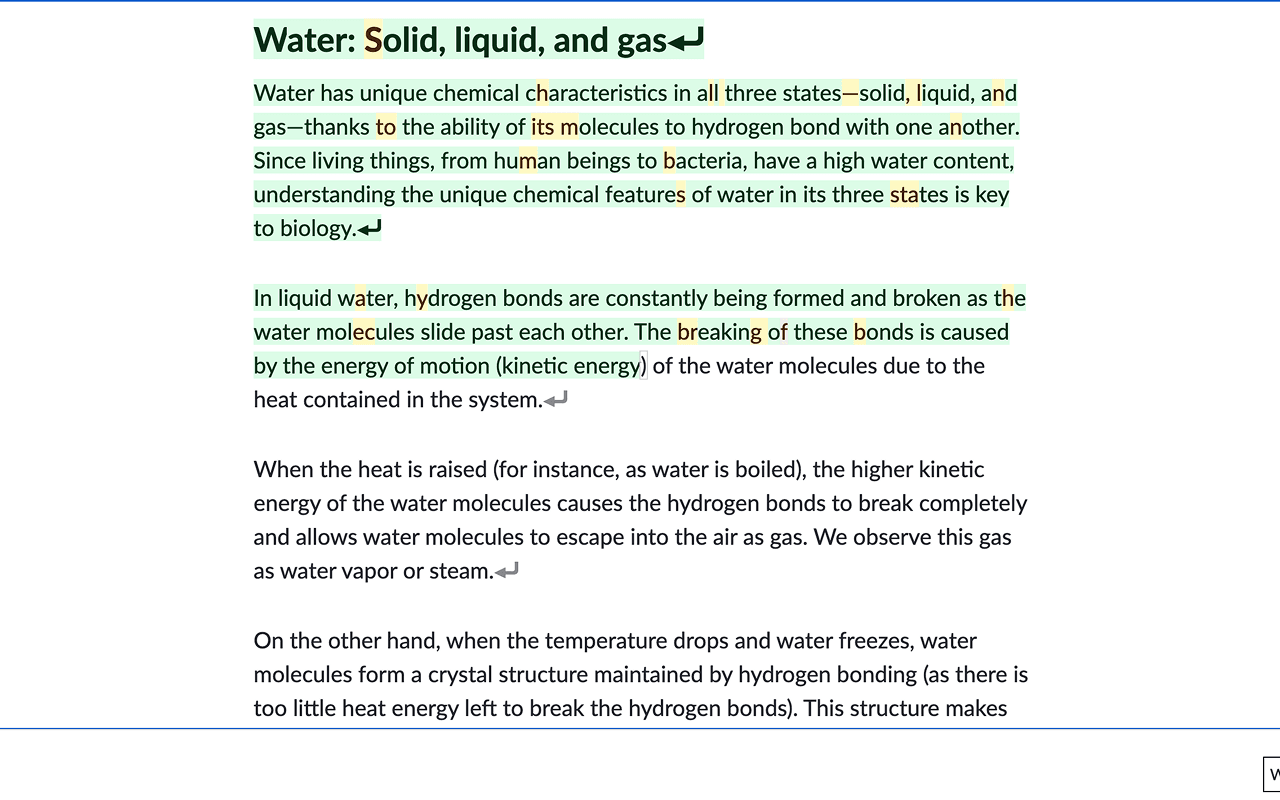
Three steps to start practicing
Up and running in under 10 seconds.
01
Install the Extension
One click from the Chrome Web Store. No sign-up, no config.
02
Select Any Text
Highlight text on any page, right-click, and choose 'Start Typing Practice' — or press Ctrl+Shift+Y.
03
Type & Improve
Type each character as it's highlighted. Track your WPM and accuracy in real time. Hit Esc when you're done.
Loved by real users
5 out of 5 stars on the Chrome Web Store.
“Works exactly as described, perfect extension!”
AT
Andrew Torrie
Dec 11, 2025
“Neat way to increase your wpm while learning or reading important emails!”
DP
Dylan P.
Dec 9, 2025